
Getting started
Identify the parts of the interface
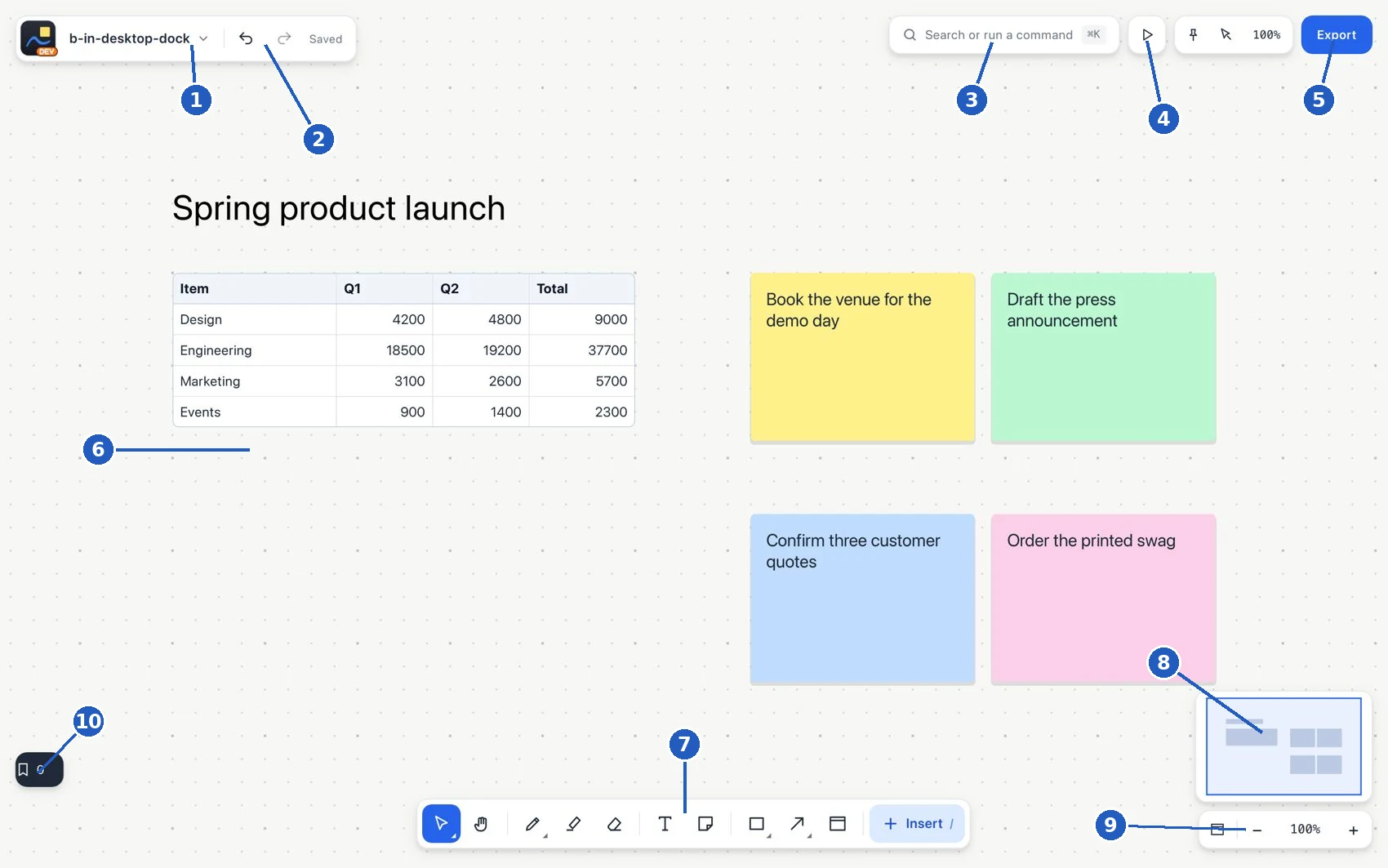
Interface map. The numbers identify controls on a desktop board.
| No. | Area | What it is for |
|---|---|---|
| 1 | Board name and menu | Identifies the open project and offers board-related options. |
| 2 | Undo, redo and save status | Reverts or repeats changes and lets you check that the board is saved. |
| 3 | Search or run a command | Finds content or runs an action by name, without hunting for the icon. |
| 4 | Presentation control | Opens the presentation; arrange its walkthrough first. |
| 5 | Export | Lets you choose the content and the format of the file you will generate. |
| 6 | Board work area | Place, read, connect, draw and organize elements. |
| 7 | Main toolbar | Choose a tool. See The toolbar at a glance and Select. |
| 8 | Minimap | Shows a reduced view of the page and the location of the visible area. |
| 9 | View and zoom controls | Fit the content to the window or change the magnification with the percentage and the plus/minus buttons. |
| 10 | Bookmarks | Return to a view, selection or element saved as a destination. |